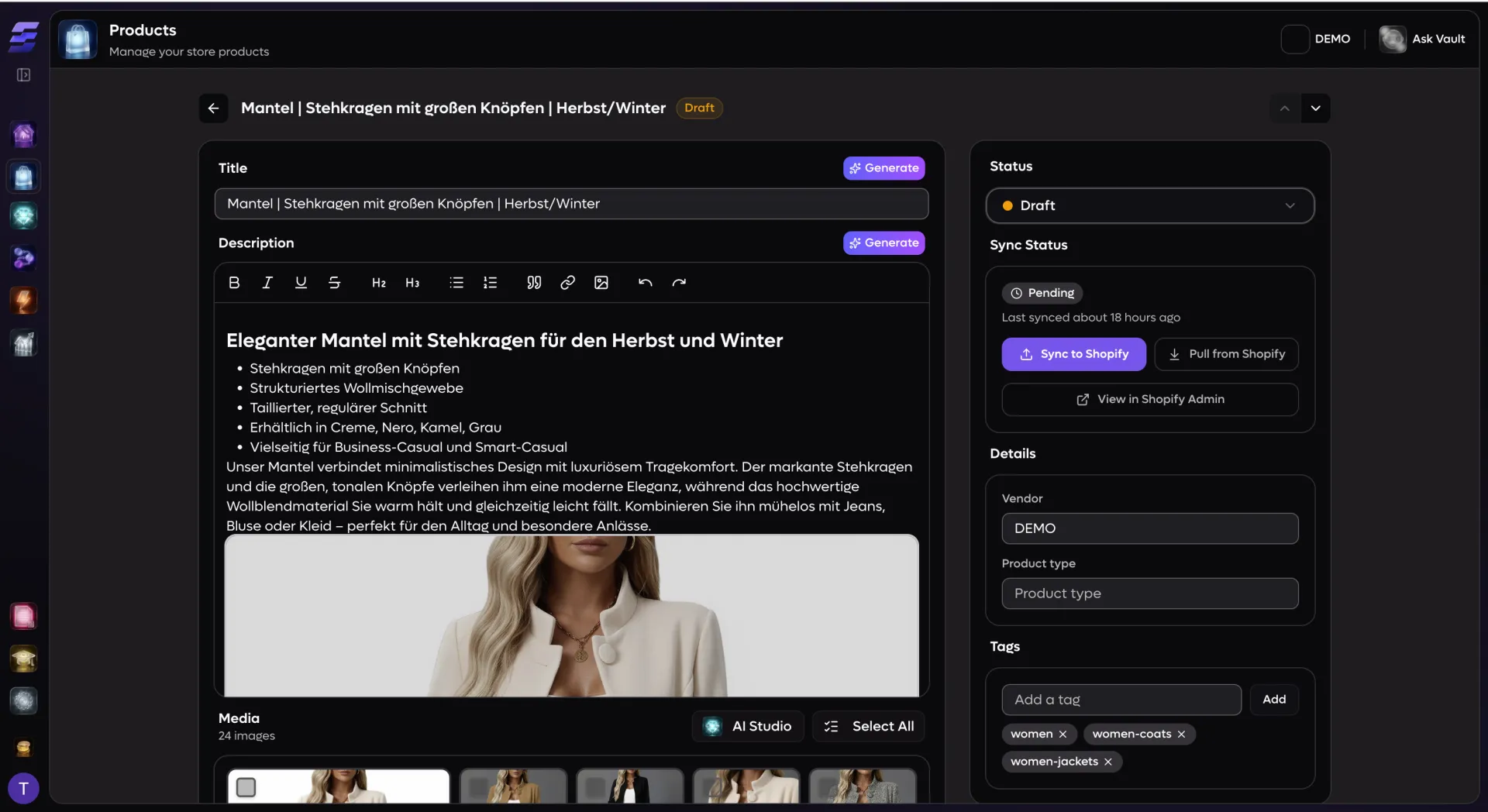
Running a multi-store e-commerce operation means staying on top of hundreds — sometimes thousands — of products. EcomVault gives you a centralized product table that loads fast, sorts by any column, and filters by status, sync state, or tag. Every product row shows its thumbnail, title, price range, inventory count, status badge, and Shopify sync status at a glance. Select individual products to edit, or switch to bulk mode and operate on up to 500 items at once. The same product can live in multiple stores, and a built-in store selector lets you jump between store-level views of the same catalog item without leaving the page. No more juggling Shopify admin tabs — everything lives in one place.
Everything you need to edit, all in one place
Rich-text descriptions: Write and format product descriptions in a full Tiptap rich-text editor with paragraph, list, bold, and italic support — product images can be referenced inline
AI-generated content: Generate up to five variations of titles, descriptions, SEO meta titles, and SEO meta descriptions with a single click — pick a quick style (Shorter, Longer, Creative, Professional) or write custom instructions for the AI
Template-driven generation: Apply content templates to your AI generations so every product follows your brand voice — templates support short-form structure patterns, long-form block sequences, good/bad examples, and length constraints
Variant and option management: Define up to three product options (Size, Color, Material, or any custom attribute), add and remove values, and manage the resulting variant matrix — each variant has its own SKU, price, compare-at price, inventory quantity, and barcode
Drag-and-drop media gallery: Reorder product images by dragging, set a primary hero image, select and bulk-delete images, expand any image to a full-screen preview, and jump straight to AI Studio to generate new images for the product
SEO controls with live preview: Edit SEO meta titles (with a 70-character counter) and meta descriptions (with a 160-character counter) alongside a real-time Google search result preview
Sidebar details: Set product status (Draft, Active, Ready, Staging, Archived), manage vendor and product type fields, and add or remove tags with autocomplete suggestions from your existing tag library
Bulk operations that actually scale
Select products from the table and a floating action bar slides into view. From there you can apply any combination of bulk operations without reloading the page:
Bulk status changes: Set all selected products to Draft, Active, Ready, Staging, or Archived in one action — with a confirmation dialog so nothing changes by accident
Bulk Shopify sync: Push hundreds of products to your connected Shopify store at once — products already in progress are automatically skipped, and you get a toast showing exactly how many were queued, skipped, or failed
Bulk add tags: Type new tags or select from existing suggestions and apply them across every selected product
Bulk remove tags: See which tags are shared across the selection and remove them in a single operation
Bulk delete: Permanently remove selected products, their variants, and all associated media records — with a destructive confirmation dialog
Select all matching: When your filter returns more products than fit on one page, a banner lets you extend the selection to every product matching your current filters — not just the visible page
Shopify sync built into every product
Every product tracks its Shopify sync status in real time: Not Synced, Pending, In Progress, Synced, or Failed. The product detail page shows a dedicated sync panel with one-click actions:
Push to Shopify: Sync the current product state — title, description, variants, images, options, and metadata — to your connected Shopify store. If the product has never been synced, EcomVault creates it. If it already exists, EcomVault updates it.
Pull from Shopify: Fetch the latest Shopify data back into EcomVault for products that were edited directly in Shopify Admin. The pull detects whether any changes actually occurred and tells you.
Retry failed syncs: If a sync fails, the error message is displayed inline and the button changes to Retry — no need to dig through logs.
View in Shopify Admin: A direct link opens the product in your Shopify Admin panel so you can verify changes without copy-pasting URLs.
Checksum-based change detection: EcomVault tracks a sync checksum per product so it only pushes fields that actually changed, keeping sync jobs fast and avoiding unnecessary Shopify API calls.
Multi-store awareness: The same canonical product can be synced to different Shopify stores with independent titles, pricing, and images per store — the store selector in the product header lets you switch between them instantly.
Bulk variant pricing: Set the price and compare-at price for all variants at once with the bulk pricing popover — ideal for flash sales or seasonal adjustments.