Core Feature

Workflows

Chain AI text, image, and video generation into visual pipelines that turn raw products into store-ready listings automatically.
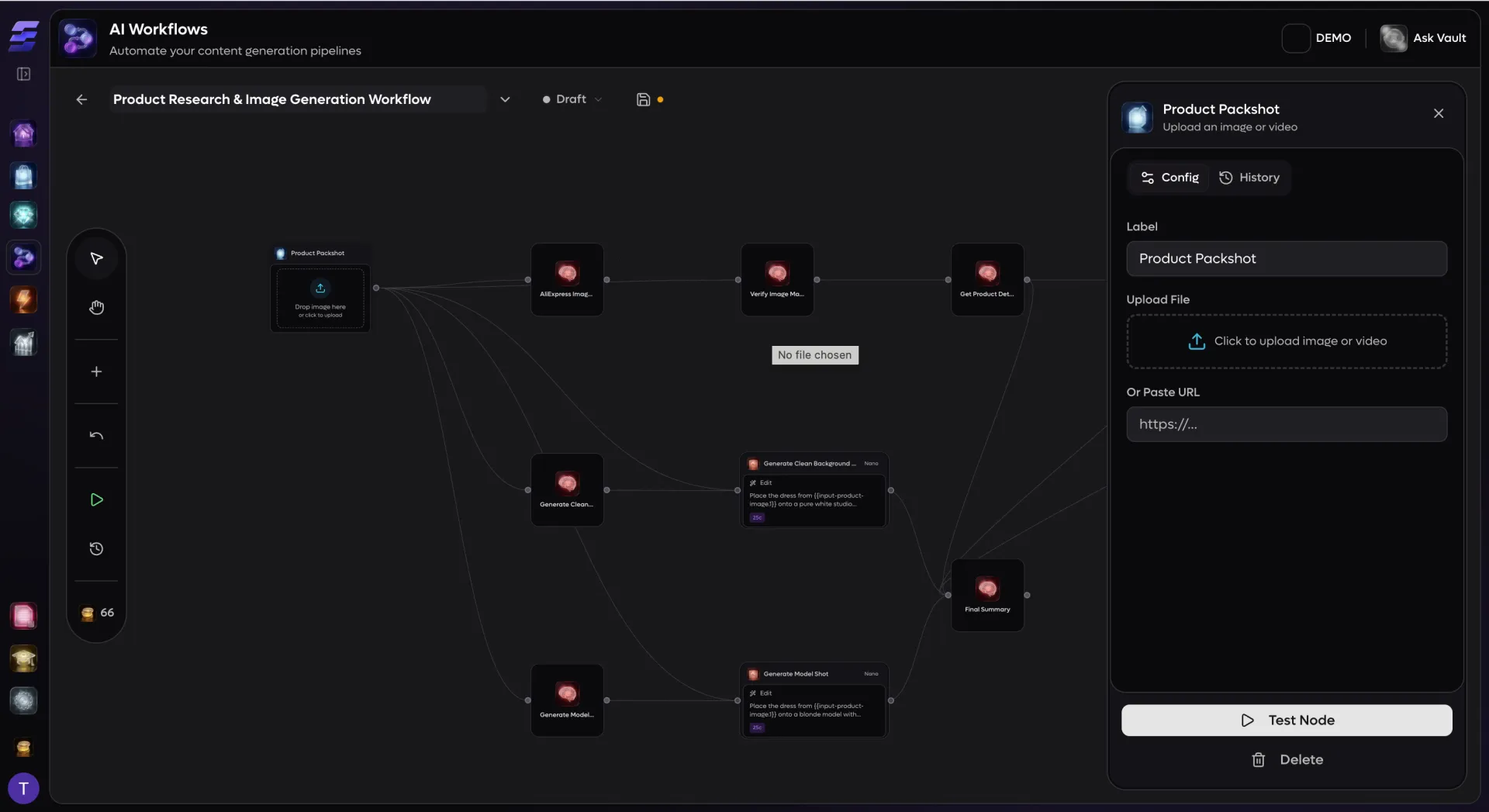
Workflows

A visual canvas for your entire product pipeline

EcomVault Workflows gives you a full drag-and-drop canvas powered by React Flow where every step of your content pipeline becomes a connected node. Drag a Product Source onto the canvas, wire it into a Text Block that rewrites your description, chain that into an Image Block that generates lifestyle photography, and finish with a Save to Product or Shopify Sync node that pushes everything back to your store. The entire flow is visible at a glance, and you build it without writing a single line of code. An AI copilot can even generate entire workflows from a plain-language prompt -- describe what you want, and it designs the node graph for you, complete with model selection and prompt templates.

Five trigger types, one execution engine

Manual trigger: Launch any workflow on demand from the editor or the product library. Perfect for one-off tasks like seasonal photo refreshes or flash-sale prep.
On product import: Kick off a workflow the moment new products land from a supplier import, so every listing is enriched and store-ready before you even review it.
Scheduled runs: Set cron-based schedules to re-optimize descriptions, regenerate images, or sync inventory on a recurring cadence.
Staging group trigger: Automatically process products when they enter a staging group, bridging your import pipeline directly into content generation.
Webhook trigger: React to external signals -- supplier stock updates, price changes, or third-party notifications -- by pointing a webhook URL at any workflow.
Batch execution: Select up to 100 products from your library and run them all through a workflow in one click. EcomVault handles queuing, parallel execution, credit estimation, and per-node progress tracking behind the scenes.
Conditional branching: Route products down different paths with the Condition node. Write expressions using variable references, comparison operators, and logical combinators (AND, OR, NOT) along with helpers like contains, startsWith, and endsWith to branch on category, price, tags, or any upstream output.

12 node types across source, AI, and output categories

Product Source: Pull a product and its media from any connected store, with control over which images to pass downstream (first, all, or a specific index).
File Source: Upload an image or video directly into the workflow as a starting asset.
Model Source: Select AI-generated model images from the Studio model library for virtual try-on and lifestyle compositions.
Text Block: Generate, analyze, or transform text with multi-model support (Gemini Flash, Gemini 2.5 Flash, Grok 4, GLM-4.6V, and more). Supports plain text, JSON structured output with a custom schema builder, and variation mode that produces multiple alternatives in a single call.
Image Block: Generate images from prompts, edit existing images with scene transformation models (Nano Banana, FLUX 2 Pro, Seedream, GPT-Image), remove backgrounds, or upscale to 4K -- all with full model selection and aspect ratio control.
Video Block: Generate short product videos from a single image using models like Kling 2.6 Pro, Runway Gen-3, MiniMax Video, or Luma Ray 2. Configure duration, resolution, and motion prompts per node.
Condition: Branch the workflow into true/false paths based on expressions that reference upstream node outputs via the built-in variable system.
Delay: Insert a timed pause between nodes for rate-limiting or sequencing external systems.
Save to Product: Write generated images, videos, and text back to any product in your library with configurable media roles (gallery, cover, featured) and optional alt-text sourcing.
Shopify Sync: Push titles, descriptions, and images directly to a connected Shopify store with create, update, or upsert modes.
Comment: Add non-executable annotations anywhere on the canvas for documentation and team communication.
Variable system: Every node exposes its outputs as insertable variables (via a {{ }} syntax and a visual picker). Text blocks with JSON output schemas expose each field individually, so downstream nodes can reference specific structured data like pricing, SEO metadata, or product attributes without manual parsing.

Built for reliability, visibility, and scale

Durable execution engine: Workflows execute on Cloudflare Workers using a step-based architecture. Each topological level of the graph becomes a durable step, with nodes at the same level running in parallel via Promise.all. If a node fails, credits are automatically refunded for unexecuted steps.
Real-time run tracking: A dedicated Runs panel inside the editor shows every execution with per-node status indicators (pending, running, completed, failed, skipped), duration timings, and error messages. The UI polls for live updates while a workflow is in flight.
Pre-run validation: Before execution, the engine validates every node -- checking for missing prompts, unselected models, disconnected image inputs, and model-specific requirements (e.g., edit models that need a source image). Issues are surfaced in a dialog with one-click navigation to the offending node.
Credit estimation: The toolbar displays a live credit estimate as you build, broken down per node. Batch runs show total cost across all selected products before you commit.
Undo/redo and auto-layout: Full undo/redo history with keyboard shortcuts (Cmd+Z / Cmd+Shift+Z). One-click auto-layout organizes messy graphs into a clean left-to-right DAG.
Templates and publishing: Mark any workflow as a template and publish it to your organization with a category tag (Content Generation, SEO, Media, Product Import, Translation, or Custom). Duplicate workflows instantly to iterate without breaking production pipelines.
Run history and audit trail: Every execution is persisted with full node-state snapshots, per-node logs with input/output data, duration metrics, and credit usage. Debug any past run by expanding it in the Runs panel to see exactly what each node produced.